Thursday, May 21, 2009

New Home Theater PC (HTPC)


SO I've just finished purchasing my components for a new media center pc for my sister. I stuck to a budget of 400, and I almost did it. I exclusively shopped at newegg.com, and maybe could have found the components for dollars cheaper elsewhere saving big bills overall, but hey... it was her money.


Components:
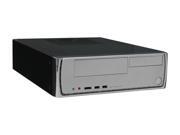
  • 3.8" x 12.8" x 16.8"
  • Only one 3.5" internal slot (AKA only one hard drive)
  • Slim Case equals not being able to fit PCI card easily without bending the metal a bit. Luckily I did not purchase any cards
Motherboard - ASUS M3A78-EM
  • Onboard Graphics with HDMI and DVI output
  • OK audio onboard
  • Originally wanted to get two 620GB in RAID 0, but at the last minute I had to change the computer case because our shelf system only has space for something with a height less then 4.5". I ended up finding this cheap case, and my sister preferred having 1TB instead of having a RAID array...which she did not understand, even when I used words like awesome and better.
  • LightScribe Technology is pretty cool... burn images into the top of CDs, glue them to the top of a light board and BAM you got art!
  • Opted out of a Blu Ray drive... her choice.
So my sister already has a G wireless USB dongle she'll use for internet, and she'll be connecting this to her 42" 720p TV for her movie watching enjoyment.

As I've just bought the parts, I'm anxious to get the parts and see how well the onboard audio works with some Logitech 5.1 speakers I own, and depending how that goes I'll buy a slim 5.1 audio PCI card. The only other costs I'm missing are cables, and possibly a quiet replacement fan for the case or CPU if need be.

Tuesday, May 05, 2009

Programs for Fresh Windows Install

Most of the programs I list are either categorized programs that run in the background, utilities, or general use. Programs to install on a clean XP or vista install:

Just be sure when you install programs, you unselect toolbars, free offers, Ebay offers, Emusic offers, Adobe offers, etc.

Background:

Security:
NOD32

Utilities:
Diskeeper Disk Defragmenter

Internet:
Google Chrome (See this Post)
Office:
Microsoft Office 2007 with Service Pack 2

Media:
I'll maybe update this list later after awhile, and realize I don't use half of these programs on a daily basis.


Saturday, May 02, 2009

Google Chrome

The latest and maybe the easiest to use browser is chrome. It simple display and tabbed browsing make sense and easy to navigate.

  1. Download and Install Google Chrome: http://www.google.com/chrome
  2. Download Google Chrome Channel changer: http://chromium.googlecode.com/files/chromechannel-2.0.exe
  3. Run the Channel Changer and choose Dev. Click update, and then close.
  4. Right click the shortcut to open Chrome (either in your taskbar or desktop), and select properties. Edit the end of the link to look like this: chrome.exe --enable-extensions
  5. save and start Chrome.
  6. In the top right corner, select tool wrench, select About Google Chrome. It should scan and tell you whether or not you need to update. Currenlty I'm on the dev channel and running 2.0.177.1
  7. goto http://www.adsweep.org/ and click AdSweep.crx to install Adblock for your Chrome browser. It should ask you if you want to install it.
  8. goto http://www.chromeplugins.org/google/chrome-plugins/ie-tab-needed-2-52.html#post8471 if you want to learn howto create an IE Tab button for Chrome (this will allow you to change the page to use the iexplore.exe engine to render the page. This is useful for sites like microsoft exchange webmail.
  9. Techradar covers 10 other ways to customize Chrome: http://www.techradar.com/news/software/applications/10-ways-to-make-chrome-as-good-as-firefox-553084
    Bookmarklets are java functions that you drag and drop onto your bookmark bar for some added function. Drag the following to your bookmark bar:
    1. Add bookmarklet to open up google bookmarks: GoogleBookMarks
    2. Detect RSS Feed
    3. Step 3 from the techradar had bookmarklets that let you access twitter quickly
  10. Having Google Gmail, Calendar, and Documents accessable offline is some useful you can setup in any of your browsers by installing Gears: http://gears.google.com/# . Whenever you visit those 3 sites, in the top bar, you'll be able to click on the icon next to "settings" to enable offline content.
  11. Something pretty cool with firefox was when Greasemonkey came about, it allowed users to change they way they viewed the internet. And now that comes to Chrome with Greasemetal. I haven't played with greasemetal yet, but I'm sure it will work well.
So I think that does it.